
Install
Python 3.11 or newer. The core needs NumPy, Numba, SciPy, Matplotlib and PyYAML; everything else is optional and grouped into extras.
git clone https://github.com/SpaceEngineerSS/ArtemisThermalBase.git
cd ArtemisThermalBase
python -m pip install -e ".[dem,ephemeris,gui]"
| extra | adds | needed for |
|---|---|---|
dem |
rasterio | real GeoTIFF terrain |
ephemeris |
skyfield, spiceypy | real Sun positions |
gui |
PySide6, pyqtgraph | the desktop app |
docs |
markdown-it-py, Jinja2 | building this site |
dev |
all of the above, pytest, ruff, mypy | working on the code |
The first run compiles the numerical kernels and caches them next to the
source; that takes tens of seconds, once. artemis warmup does it ahead of
time.
A first run
artemis run --duration 24
This simulates one Earth day over a synthetic, Shackleton-sized bowl: 36 450
facets at 200 m, a Sun 1.8° above the horizon, 288 steps of 5 minutes. On a
four-core laptop it takes 20 to 40 seconds. The run folder output/ then holds
the arrays, a metadata file and five figures (temperature.png,
illumination.png, ice_stability.png, timeline.png, hero.png). Open the
folder in the app to explore it:
artemis ui output
A few variations:
artemis run --cratersize 2000 --duration 6          # a small crater, quick
artemis run --point-source --dt 900 --duration 72   # no penumbra, coarser steps
artemis run --spinup-cycles 1 --duration 708.7      # one lunar day of spin-up, then one recorded
artemis run --help lists every option; Configuration
lists every setting behind them.
Real terrain
Two downloads, both from official sources and both checked by hash or recorded with provenance.
# NAIF kernels for the Sun and the Moon's orientation (~47 MB)
python tools/fetch_research_data.py --group ephemeris

# A 40 km window of the LOLA DEM around Shackleton, reprojected to
# polar stereographic at 200 m (reads ~60 MB of the 8 GB global product)
python tools/prepare_lola_dem.py --extent-km 40 --resolution-m 200 \
    --output data/processed/shackleton_lola_200m.tif
Then run the bundled real-terrain preview, one spin-up lunar day plus one recorded lunar day:
artemis run --config shackleton_preview \
    --dem data/processed/shackleton_lola_200m.tif --output output/shackleton
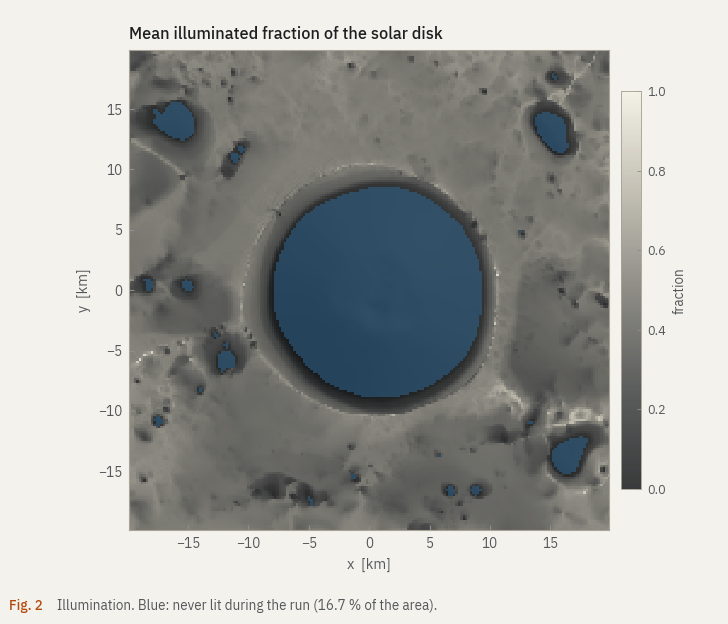
On an eight-core laptop (AMD Ryzen 5000 series) this took 9 minutes for 79 202 facets and 4 252 steps. The figures on this site come from that run.
The research configuration
research_shackleton is the configuration meant for results you would
defend. It refuses to start unless the DEM has a valid provenance sidecar, the
Sun comes from SPICE, and at least three lunar days of spin-up precede the
recorded period. It also uses 64 disk samples, terrain infrared with 512 rays
per facet and 2-minute steps, so expect hours on a workstation, not minutes.
python -m artemis_thermal.validation.check_research_readiness --dem data/processed/shackleton_lola_200m.tif
artemis run --config research_shackleton \
    --dem data/processed/shackleton_lola_200m.tif --output output/research
The readiness check loads everything the run will need and writes a JSON report, so a missing kernel or a mismatched DEM fails in seconds rather than after an hour.
When something goes wrong
- The run refuses to start
- The message names the limit. Most often it is
resources.max_memory_mb: use a coarser cell size, a smaller DEM window, or turn off terrain infrared. FileNotFoundErrorfor kernels- Run
python tools/fetch_research_data.py --group ephemerisfrom the project folder, or give absolute paths inephemeris.kernel_files. - The first run is slow to start
- That is Numba compiling. It happens once per install;
artemis warmupmoves it to a moment of your choosing. - The app does not start
artemis uineeds theguiextra. On Linux, Qt also needs a few system libraries (libegl1,libxkbcommon0,libfontconfig1).