
Measured
One simulated day of the synthetic Shackleton bowl at three cell sizes:
16 solar-disk samples, Hapke, roughness, dt 300 s, no terrain infrared.
Columns start at their equilibrium temperature, as in a real run. Measured
with python tools/bench.py on an eight-core laptop (AMD Ryzen 5000 series,
16 threads, Windows 11, Python 3.11, Numba 0.63) with nothing else running.
| cell size | facets | BVH | shadows | conduction | one day | peak memory |
|---|---|---|---|---|---|---|
| 400 m | 9 248 | 0.02 s | 2.1 s | 2.1 s | 4.2 s | 130 MB |
| 200 m | 36 450 | 0.07 s | 6.4 s | 6.5 s | 13.0 s | 158 MB |
| 100 m | 145 800 | 0.24 s | 31.9 s | 28.4 s | 61 s | 275 MB |
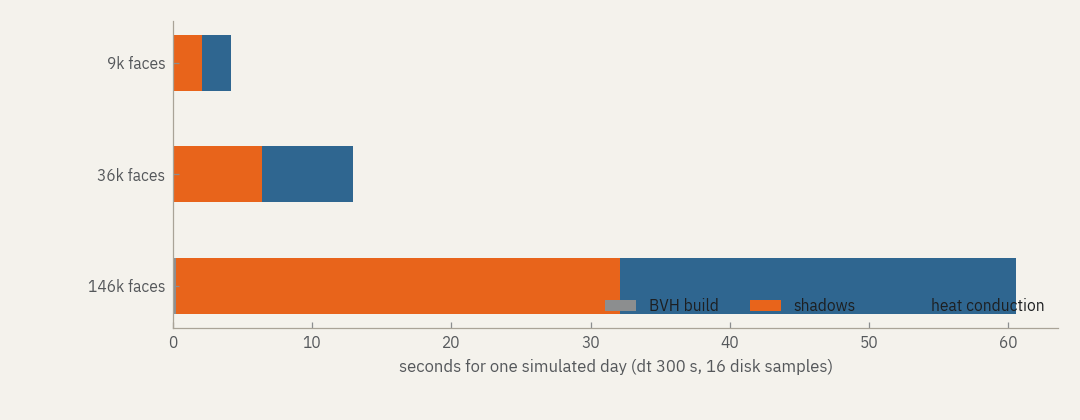
Cost grows linearly with the number of facets and the number of steps. Shadows also grow with the number of disk samples, roughly in proportion. Terrain infrared adds a one-off Monte Carlo pass (seconds to minutes) and a sparse product every step.
The real-terrain example in Getting started, 79 202 facets over two lunar days at 20-minute steps, took 9 minutes on the same laptop.
Compared with 0.4
| 0.4 | 0.5 | |
|---|---|---|
| BVH for 583 200 triangles | 338 s | 1.1 s |
| Conduction step, 20 000 columns | 41 ms | 34 ms |
| Memory of a one-month run at 1M facets, hourly output | grows to ~11 GB | flat, ~1.2 GB |
| Test suite | 97 s | 19 s |
Shadow maps from the new BVH are bit-for-bit identical to the old ones.
The starting temperature matters more than one would guess. From a uniform 200 K the cold columns need the full twenty Newton iterations for many steps; our first benchmark did that by mistake and the conduction column was thirteen times slower. The default equilibrium start avoids it.
Memory
Per facet, a run needs roughly
| part | bytes |
|---|---|
| thermal state, 101 nodes | 808 |
| BVH and triangle copies | 230 |
| mesh | 92 |
| per-step work arrays | 112 |
| terrain infrared, 128 rays | 4 096 |
so about 1.2 kB per facet without terrain infrared and 5 kB with it. The run
works out this estimate before it starts and stops if it exceeds
resources.max_memory_mb (1.5 GB by default). The app shows it as you type.
| machine | comfortable | with terrain infrared |
|---|---|---|
| 8 GB laptop | 1 million facets | 250 000 facets |
| 16 GB | 2.5 million | 600 000 |
| 32 GB workstation | 5 million | 1.2 million |
Above 1.2 million facets, raise resources.max_memory_mb to match the machine.
When a run is too big or too slow
In order of effect:
- Coarser cells. Doubling the cell size divides facets by four.
- A smaller window. 20 km instead of 40 km is a quarter of the facets.
- Point source. One ray per facet instead of sixteen; you lose penumbra.
- Longer steps. 1200 s instead of 300 s for long previews; see the error table in Configuration.
- Fewer stored maps.
--output-interval 21600stores every six hours. - Fewer threads, if the machine must stay usable:
NUMBA_NUM_THREADS=4.
The first run after installing compiles the kernels (tens of seconds) and
caches them; artemis warmup does this ahead of time.